





Brevo Review (2026): Pricing, Features, Pros & Cons

Brevo is one of those tools that quietly replaces 3–4 others in your stack. It’s not trying to be the flashiest email platform — it’s trying to be the most practical. And for most creators, freelancers, and small teams, that’s exactly what makes it powerful. If you hate paying for subscribers you’re not even emailing, Brevo will feel like a breath of fresh air.

Qucik Verdict (TL; DR)

4.5/5

Best For:

Feelancers, small businesses, and growing teams who want an all-in-one marketing platform without paying inflated costs as their contact list grows.

Pricing:

What is Brevo?

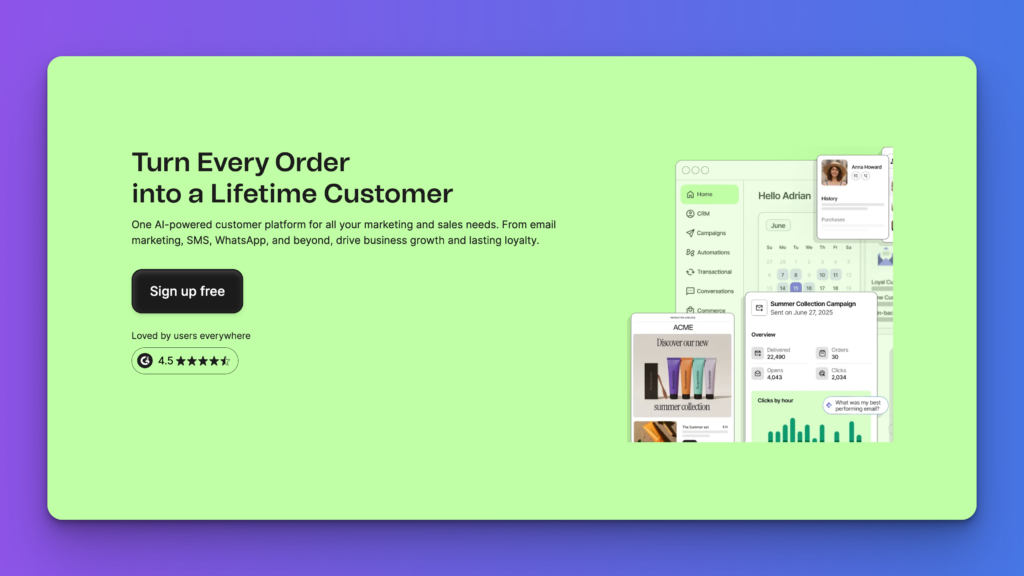
Brevo (formerly Sendinblue) has evolved from a simple email marketing tool into a full-blown relationship marketing platform. Instead of just sending emails, you can manage your entire customer journey — from first touch to conversion — in one place.

Inside Brevo, you get email marketing, SMS, WhatsApp campaigns, CRM, automation, and even sales tools. The big idea? Replace fragmented tools with one system that actually talks to itself.

What stands out immediately is how Brevo approaches pricing. Unlike competitors that charge you for every contact you store, Brevo charges based on how many emails you send. That alone makes it incredibly appealing if you’re growing a large audience but only messaging segments of it.

It’s built for efficiency — and that shows in everything from the drag-and-drop builder to its automation workflows.

Brevo’s biggest differentiator is simple: you don’t get punished for growing your list.

Most platforms charge you based on how many contacts you have — even if you’re not emailing them. Brevo flips that model. You only pay for what you actually send.

That changes everything.

You can build a list of 50,000+ subscribers, segment them properly, and only pay when you run campaigns. For creators and businesses focused on smart targeting (not blasting everyone), this is a massive advantage.

On top of that, Brevo combines email, SMS, WhatsApp, CRM, and automation into one dashboard — meaning fewer tools, fewer integrations, and fewer things breaking behind the scenes.

Brevo Features

Email Marketing Builder
Brevo’s drag-and-drop email builder makes it easy to create clean, professional emails without touching code. You can start from templates or build from scratch, and even import HTML if you want full control. It strikes a nice balance — beginner-friendly, but flexible enough for more advanced users.
Marketing Automation
Automation in Brevo is built around a simple “trigger → rule → action” system. You can create welcome sequences, abandoned cart flows, and behaviour-based campaigns without overcomplicating things. It’s powerful enough for most use cases, even if it’s not as advanced as enterprise-level tools. :contentReference[oaicite:1]{index=1}
Omnichannel Campaigns (Email, SMS, WhatsApp)
Brevo isn’t just an email tool — it lets you run campaigns across email, SMS, WhatsApp, and even push notifications from one dashboard. This means you can create coordinated campaigns (like email + SMS follow-ups) without needing multiple tools.
Built-in CRM
Brevo includes a built-in CRM that acts as a single source of truth for your contacts. You can track interactions, manage deals, assign tasks, and monitor your pipeline — all in the same platform. No need to duct-tape a separate CRM onto your stack.
AI-Powered Tools (Aura AI)
Brevo’s AI (Aura) helps generate email copy, optimise send times, and suggest audience segments based on behaviour. The nice part? You stay in control. Everything is editable — so it supports your workflow instead of replacing it.
Advanced Segmentation & Lead Scoring
You can segment your audience based on behaviour, engagement, and actions — then assign scores to identify your most valuable leads. This makes it easier to focus on people who are actually ready to convert instead of blasting your entire list.
Landing Pages & Forms
Brevo includes built-in landing page and form builders, so you can capture leads without needing additional tools. It’s not the most advanced builder out there, but it gets the job done — especially for simple funnels and lead magnets.
Reporting & Analytics
You get insights into open rates, click rates, heatmaps, and campaign performance. Higher-tier plans unlock deeper analytics and reporting dashboards. Enough to make informed decisions without needing a separate analytics tool.
Ecommerce Integrations
Brevo integrates with platforms like Shopify and WooCommerce, allowing you to trigger automations based on purchases, abandoned carts, and customer behaviour. This is where it really shines for ecommerce businesses.

My Experience Using Brevo

Using Brevo feels like stepping into a system that actually respects how modern marketing works.

You’re not just sending emails — you’re building flows.

The automation builder follows a simple “trigger → rule → action” logic, which makes it easy to map out customer journeys without overcomplicating things. Whether it’s a welcome sequence, abandoned cart flow, or follow-up campaign, it’s all pretty intuitive. :contentReference[oaicite:1]{index=1}

What I liked most is how everything is connected. You can:

  • Capture a lead
  • Score them based on behaviour
  • Trigger emails or SMS
  • Track them in the CRM

All without jumping between tools.

That said, it’s not perfect. Some advanced automation logic (like complex multi-condition branching) isn’t as flexible as higher-end tools. And if you’re on the free plan, support can feel slow.

But overall? It delivers where it matters — especially if you value simplicity and cost-efficiency over flashy features.

Brevo Pros & Cons

Pros

Pay-per-send pricing (you don’t pay for contacts you’re not emailing)
All-in-one platform (email, SMS, WhatsApp, CRM, automation)
Beginner-friendly interface with solid depth
Strong automation for most use cases
Unlimited contacts on higher tiers
Built-in CRM (no need for extra tools)
Multi-channel campaigns from one dashboard
Good value compared to tools like Mailchimp

Cons

Automation isn’t as advanced as high-end tools (limited complex logic)
Advanced features locked behind higher-tier plans
Reporting can feel basic unless you upgrade
Free plan support is slow
WhatsApp and some channels only available on premium plans
Interface can feel slightly cluttered as you scale
Not ideal for enterprise-level workflows

Pricing Breakdown

Brevo Pricing

Plan Price Best For Key Features
Starter $8/month Solo users and beginners 5,000 emails/month, Email & SMS, drag-and-drop editor, email templates, AI content generator, forms, basic reporting
Standard $16/month Growing businesses Everything in Starter, marketing automation, A/B testing, advanced reporting, AI send-time optimisation, web tracking, landing pages, no Brevo logo
Professional $449/month Data-driven teams Everything in Standard, 150,000 emails/month, WhatsApp, popups, push notifications, 10 users, contact scoring, advanced ecommerce features, AI data analyst, phone support
Enterprise Custom pricing Large organisations Everything in Professional, multi-account management, custom objects, custom loyalty engine, custom integrations, dedicated IP, SSO & SAML, tailored onboarding, CSM support

Brevo uses a send-based pricing model, which means you pay based on how many emails you send rather than how many contacts you store. That makes it a strong fit for businesses that want to grow a large list without seeing costs balloon unnecessarily.

Best Brevo Alternatives

mailchimp-icon (1)
Mailchimp

Better for beginners but more expensive as your list grows.

activecampaign-symbol
ActiveCampaign

Mailchimp has more advanced automation, but steeper learning curve and higher cost

kit-icon
Kit (ConvertKit)

Kit is better for creators and simple email funnels

hubspot-symbol
HubSpot

HubSpot has powerful CRM + marketing suite, but significantly more expensive

Who Should Use Brevo

Ideal For:

Freelancers and creators building email lists
Small businesses wanting an all-in-one marketing tool
Ecommerce brands running email + SMS campaigns
Agencies managing multiple campaigns or clients
Businesses with large contact lists but targeted messaging
Teams looking to replace multiple tools with one platform

Not Ideal For:

Enterprise teams needing highly complex automation logic
Businesses requiring deep custom CRM workflows
Users who rely heavily on advanced reporting and analytics
Teams needing full control over multi-branch automation flows
Companies that want best-in-class tools for each individual function (instead of all-in-one)

Final Verdict

CategoryScoreNotes
Ease of Use⭐️⭐️⭐️⭐️☆Simple, clean interface with a low learning curve. You can get campaigns running quickly without feeling overwhelmed.
Features⭐️⭐️⭐️⭐️☆Strong all-in-one feature set (email, SMS, CRM, automation), but lacks some advanced depth in automation logic.
Automation⭐️⭐️⭐️⭐️☆Great for most use cases with intuitive workflows, but not as flexible as tools like ActiveCampaign.
Pricing⭐️⭐️⭐️⭐️⭐️One of the best pricing models on the market. Pay-per-send makes it extremely cost-efficient as your list grows.
Reporting & Analytics⭐️⭐️⭐️☆☆Covers the basics well, but advanced insights are limited unless you’re on higher-tier plans.
Integrations⭐️⭐️⭐️⭐️☆Solid integrations with Shopify, WordPress, and other tools, though not as extensive as enterprise platforms.
Support⭐️⭐️⭐️☆☆Decent overall, but response times can be slow on the free plan.
Overall Value⭐️⭐️⭐️⭐️☆Excellent value for freelancers, creators, and SMBs who want a powerful all-in-one tool without overspending.

Brevo is one of the most practical marketing tools you can choose right now.

It’s not trying to be the most advanced platform on the market — it’s trying to remove friction. And it does that really well.

You get email marketing, SMS, WhatsApp, CRM, and automation in one place, which means fewer tools, fewer integrations, and fewer things breaking behind the scenes.

But the real standout is the pricing model. If you’re building a large audience and sending targeted campaigns, Brevo makes significantly more financial sense than most competitors.

It’s not perfect — advanced automation and reporting can feel limited compared to higher-end tools — but for most freelancers, creators, and small teams, it hits the sweet spot.

Final verdict: If you want a cost-efficient, all-in-one marketing platform that scales with you, Brevo is an easy recommendation.

Brevo FAQs

Is Brevo free?

Yes — Brevo has a free plan with up to 300 emails per day and generous contact storage.

How is Brevo priced?

Brevo charges based on emails sent, not the number of contacts stored, which keeps costs lower as your list grows.

Is Brevo good for beginners?

Yes — it’s one of the easiest platforms to get started with while still offering advanced features as you scale.

Does Brevo include a CRM?

Yes — Brevo has a built-in CRM, so you can manage contacts, deals, and pipelines without extra tools.

Is Brevo better than Mailchimp?

It depends — Brevo is usually more cost-effective, while Mailchimp has a more established ecosystem.