



MeetGeek is one of those tools that quietly becomes part of your workflow.
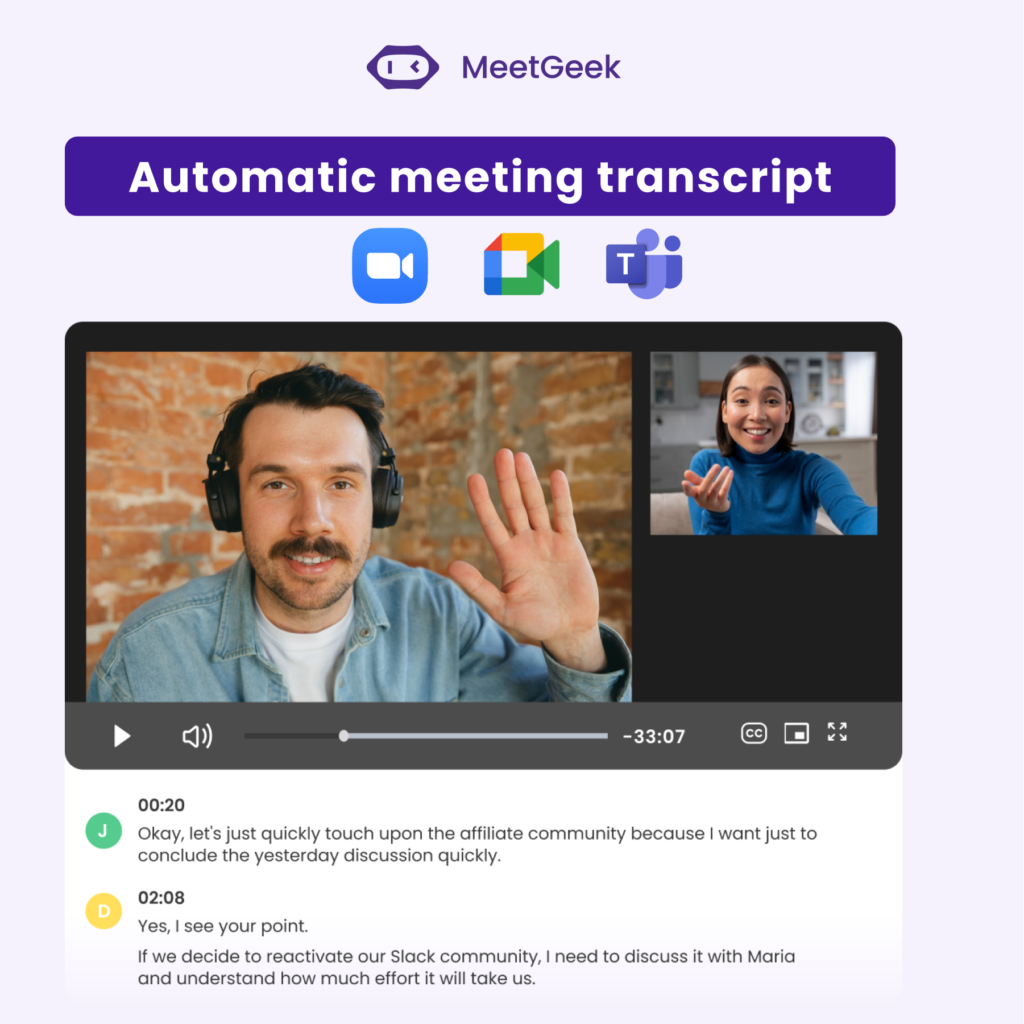
It joins your meetings, records everything, pulls out key moments, and gives you clean summaries without you lifting a finger.
But here’s the real question: does it actually save you time… or just give you more stuff to look at later?
After using it, I’d say this — if you’re in a lot of meetings and hate taking notes, it’s a no-brainer. If you’re not, it might feel like overkill.
Free plan available
MeetGeek is an AI meeting assistant that automatically records, transcribes, and summarizes your meetings.
Think of it as that one person in every meeting who:
Except it does it instantly… and doesn’t get tired.
It works with tools like Zoom, Google Meet, and Microsoft Teams, and integrates with platforms like Notion, Slack, and CRM systems.
MeetGeek isn’t just a meeting recorder — it’s a workflow tool. By pushing structured summaries into tools like Notion, Slack, or your CRM, it turns meetings into actionable systems instead of isolated conversations.
I’ve tested quite a few AI meeting assistants, and most of them promise the same thing: “never take notes again.” In reality, many fall short — either the summaries are too generic, the setup is clunky, or you still end up rewatching recordings anyway.
MeetGeek was one of the few tools that actually delivered on the promise.
The first thing I noticed was how effortless it is to get started. Once connected to your calendar, MeetGeek automatically joins your meetings — no need to manually invite a bot every time. That alone removes a surprising amount of friction, especially if you’re in back-to-back calls.
But the real value shows up after the meeting ends.
Instead of dumping a long transcript or a vague summary, MeetGeek organizes everything into clear sections: key points, decisions, and action items. This structure makes a huge difference. I found myself actually using the summaries — not just generating them and ignoring them like I’ve done with other tools.
One standout moment was during a longer strategy call (around 45 minutes). Normally, I’d either take rough notes or plan to revisit the recording later (which rarely happens). With MeetGeek, I could quickly scan the summary and instantly recall what mattered — including specific decisions and who was responsible for what.
The searchable transcripts are another underrated feature. Being able to type in a keyword and jump directly to that part of the conversation saves a lot of time, especially when you’re trying to find a specific detail days later.
Where MeetGeek really becomes powerful, though, is in its integrations. Pushing summaries into tools like Notion or Slack turns it from a passive recorder into something that actively fits into your workflow. Instead of meetings living in isolation, they become part of your system.
That said, it’s not perfect. Like any AI tool, summaries can occasionally miss nuance or over-simplify complex discussions. And if your meetings are highly unstructured or chaotic, the output can reflect that.
Still, compared to most alternatives, MeetGeek strikes a strong balance between automation and usefulness. It doesn’t just save recordings — it actually helps you use your meetings better.
Pros
Cons
| Plan | Price | Best For | Transcription Limits | Storage | Key Features |
|---|---|---|---|---|---|
| Basic | Free | Occasional users / light meetings | 3 hrs/month | 3 months transcripts1 month audio | Recording (Zoom, Meet, Teams)AI summariesSearchable transcriptsFolders & tagsMobile + Chrome extension |
| Pro | $9.99/user/month | Regular users & freelancers | 20 hrs/month | 1 year transcripts6 months audio | Everything in Basic +Meeting templatesAuto-detectionIntegrations (Zapier, Make, etc.)AI chat with meetingsAnalytics & exports |
| Business | $17/user/month | Teams & heavy meeting workflows | Unlimited | Unlimited transcripts12 months video | Everything in Pro +HD video recordingTeam collaborationMeeting analyticsCustom summaries & brandingAdvanced workflows |
| Enterprise | Custom pricing | Large organizations | Unlimited | Custom storage | Everything in Business +SSO & SCIMCustom data policiesVoice agents & avatarsDedicated onboardingOn-premise options |
very similar, slightly more mature
Strong transcription, weaker workflows
great free option, simpler UX
more sales-focused
Ideal For:
Not Ideal For:
| Category | Score | Notes |
|---|---|---|
| Ease of Use | ⭐️⭐️⭐️⭐️⭐️ | Very easy to get started with. Once it’s connected to your calendar, MeetGeek does most of the work in the background. |
| Summary Quality | ⭐️⭐️⭐️⭐️☆ | The summaries are clean, structured, and genuinely useful. They’re not perfect, but they’re better than the vague output a lot of AI meeting tools produce. |
| Automation | ⭐️⭐️⭐️⭐️⭐️ | Auto-joining meetings, recording calls, and generating summaries without manual effort is where MeetGeek really shines. |
| Integrations | ⭐️⭐️⭐️⭐️☆ | The integrations are solid and make the tool more useful, especially if you already work in Notion, Slack, or a CRM. The value depends on how connected your workflow is. |
| Value for Money | ⭐️⭐️⭐️⭐️☆ | The free plan is generous enough to test properly, and the paid plans make sense if you’re in meetings regularly. |
| Overall Score | ⭐️⭐️⭐️⭐️☆ | MeetGeek is one of the better AI meeting assistants I’ve used. It saves time, reduces mental clutter, and turns meetings into something you can actually act on. |
If you’re in meetings often, MeetGeek is the kind of tool that quietly proves its value over time.
It removes a lot of the friction that comes with note-taking, follow-ups, and trying to remember who said what. Instead of letting meetings disappear into the void, it gives you something structured and usable afterward.
That’s what makes it stand out.
It’s not just a recorder. It’s a workflow tool.
That said, it won’t be essential for everyone. If you only have the occasional meeting, or you know you’re never going to revisit summaries, it may feel like more tool than you need.
But for founders, freelancers, agencies, and teams that spend a lot of time on calls, MeetGeek is a smart upgrade. It saves time, reduces admin, and helps you get more value out of every meeting.
Yes — MeetGeek has a free plan that includes limited transcription hours per month. It’s enough for light users to test the tool before upgrading.
Yes. Once connected to your calendar, MeetGeek can automatically join scheduled meetings, so you don’t have to invite it manually every time.
They’re generally very good for structured meetings. You’ll still want to skim them, but they capture key points, decisions, and action items reliably.
Yes — it supports all major meeting platforms, including Zoom, Google Meet, and Microsoft Teams.
Yes. One of its best features is searchable transcripts, so you can quickly find specific moments or discussions without rewatching recordings.
If you’re in frequent meetings and want to save time on note-taking and follow-ups, it’s absolutely worth it. If you rarely have meetings, it may feel unnecessary.
For most people, yes — but it depends on your workflow. Some users still prefer adding quick personal notes alongside the AI summaries.